
In this guide
Compare supplier quotes only after confirming that each supplier priced the same configuration, source revisions, quantities and acceptance scope. A lower headline price can reflect an older model, omitted finish or excluded inspection rather than a more efficient production offer.
Create a quote-basis ledger before distributing the RFQ. It should identify the engineering package and the commercial assumptions without making suppliers reconstruct them from several emails.
Issue one identifiable package
Include the controlled CAD and drawings, material and finish schedule, quantity bands, supplied components and requested inspection evidence. Give the package a revision and retain a manifest. State how clarifications and revised files will be issued.
| Quote-basis item | Supplier response to request | Comparison risk |
|---|---|---|
| CAD and drawing revision | Confirm both identifiers | Different geometry priced |
| Material and finish | Identify exact proposal or exception | Substitution hidden in price |
| Quantity and delivery scope | Confirm production and packaging assumptions | Different unit-cost basis |
| Tooling and setup | Separate one-time items | Upfront cost omitted |
| Inspection and samples | State included evidence | Acceptance work excluded |
Separate clarifications from changes
Answer a question about an existing requirement without silently changing it. When a response changes geometry, finish or acceptance scope, issue a new revision and tell every affected bidder which previous package it supersedes.
Ask each supplier to acknowledge the revised basis. Do not assume an email attachment has replaced the source already used by its estimator or subcontractor. Save the acknowledgement with the quote.
Onshape’s release-management description explains controlled revisions and visibility of changes.1 Apply the same principle to the external RFQ: make the priced baseline stable and the change visible.
Normalize the quote before comparing totals
Separate recurring unit cost from tooling, setup, samples, inspection, packaging, freight, duties and other applicable items. Mark an excluded or unanswered item as unknown, not zero. Use the agreed currency and quote validity date.
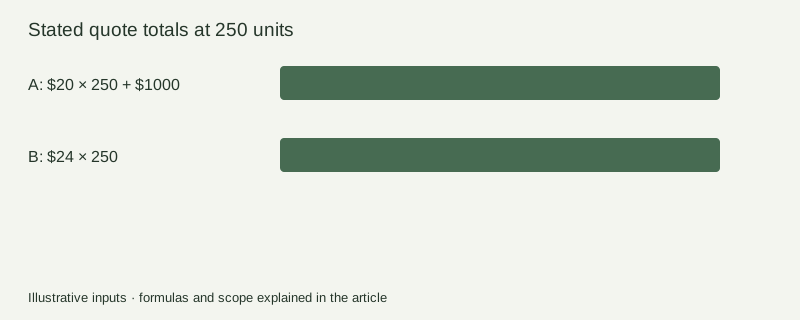
For an illustrative comparison, supplier A quoting $20 per unit plus $1,000 setup and supplier B quoting $24 with no setup have equal stated totals at 250 units, because 20 × 250 + 1,000 = 24 × 250. That calculation only compares those stated terms; missing tooling ownership, inspection or freight can change the decision.
Reopen the right questions after a revision
If a mounting interface changes, identify affected tooling, inspection fixtures, supplied components and assembly work. Ask which quote lines change and why. Preserve the original quote so the cost of the change remains traceable.
Use the DFM request guide to resolve manufacturability questions and the design-freeze guide to define the authorized package. A quote is not a manufacturing approval.
Keep a receiving-ready ledger
Download the RFQ basis and exception sheet. It leaves supplier responses, amounts and approvals blank. Record actual answers and retain the source files used for each quote.
The Rendora product workflow helps connect supplied engineering sources, configurations and handoff files. Commercial quotation and supplier acceptance remain recorded decisions outside a visual preview.
RFQ questions
Must every supplier use the same manufacturing process?
You can request alternatives, but label them separately and compare their functional, tooling and acceptance implications rather than mixing them into one unqualified price ranking.
Should an unanswered cost field count as zero?
No. Keep it unknown until clarified, then recalculate the complete scope.
References
- Onshape, Release management, checked October 26, 2026.
About this guide
Rendora publishes practical guides for teams working with configurable 3D assets and traceable production handoffs. Updated October 26, 2026.