
In this guide
Launch the smallest complete assortment you can accurately sell, rather than waiting for every imaginable image. A complete assortment has identifiable configurations, the views needed to answer purchase questions and a verified destination mapping. More files do not compensate for an unapproved finish or a missing included-component view.
For a furniture launch, separate product readiness from creative ambition. A hero campaign scene can be outstanding while the product page still lacks a rear view, seat construction detail or clear explanation of an optional ottoman.
Choose the release unit
Use the sellable configuration as the launch unit. List its SKU, finish, dimensions source, included parts and approved reference. A parent family may be useful for navigation but is too broad for checking exactly what a shopper can buy.
Classify configurations as ready, awaiting reference or blocked by a product decision. Rank the ready set by your actual launch commitments and merchandising priorities. Do not invent demand forecasts to make the ranking look analytical.
| Image question | First useful deliverable | Blocking input |
|---|---|---|
| What is the whole product? | Complete neutral-background view | Approved geometry |
| What changes with this option? | Comparable finish or component view | Approved option mapping |
| What will I touch? | Material and construction detail | Physical reference |
| What is included? | Labeled contents explanation beside the image | Bundle definition |
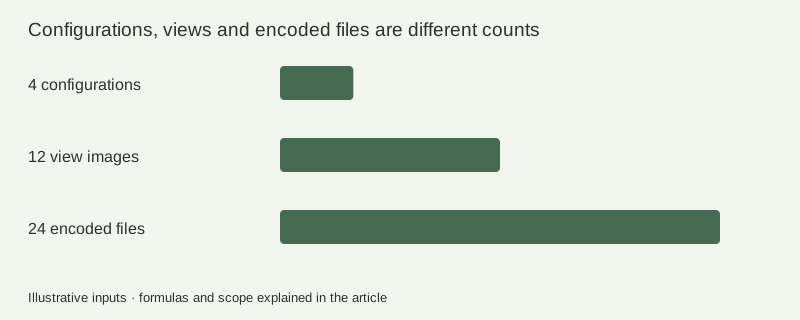
Count views, derivatives and products separately
Suppose a launch has four configurations and three distinct views each. That is twelve view-and-configuration images. Encoding each as JPEG and WebP produces 24 files. A second crop might create more derivatives, but it does not add product coverage unless it answers another useful question.
Record these counts separately in the quote and acceptance sheet. Include modeling, material work, scene creation, review rounds and source handoff as separate scope items. An inexpensive per-image quote can exclude the work that makes those images possible.
Google’s image best-practice guide distinguishes primary, alternate and lifestyle image roles.1 Use the receiving channel’s current rules alongside the product questions; a recommended gallery size is not a substitute for choosing meaningful views.
Approve a pilot before multiplying finishes
Pick the hardest ready configuration, not the easiest. Include a dark fabric, reflective leg or complex join if those appear in the assortment. Approve silhouette, proportions, material interpretation, camera and background before expanding the batch.
Record corrections against source regions. “Frame too glossy” and “wrong base model” belong to different dependencies. Once a pilot is approved, freeze the unchanged camera and geometry for comparable finish images. Use the variant consistency guide for this review.
Release in useful waves
Wave one can cover the ready configurations with essential views. Wave two can add contextual scenes and deeper details. A later product correction should reopen affected outputs, not every completed image. Keep missing or blocked items visible so merchandising never substitutes an unrelated family image just to fill a slot.
The launch coverage sheet is a blank register for this sequence. Populate actual SKU and reference data before assigning production status. Build approved configurations in the Rendora option library, then inspect files using the image quality checklist.
Launch questions
Can one hero represent every finish?
Use a family hero for discovery if appropriate, but the selected product must have a truthful visual representation. Avoid showing one material while the selection names another.
Should unfinished configurations hold back the entire range?
Only when the commercial launch requires them. Make readiness explicit and publish a complete, accurate subset rather than hiding unknowns.
References
- Google Merchant Center, Image best practices, checked October 26, 2026.
About this guide
Rendora publishes practical guides for teams working with configurable 3D assets and traceable production handoffs. Updated October 26, 2026.