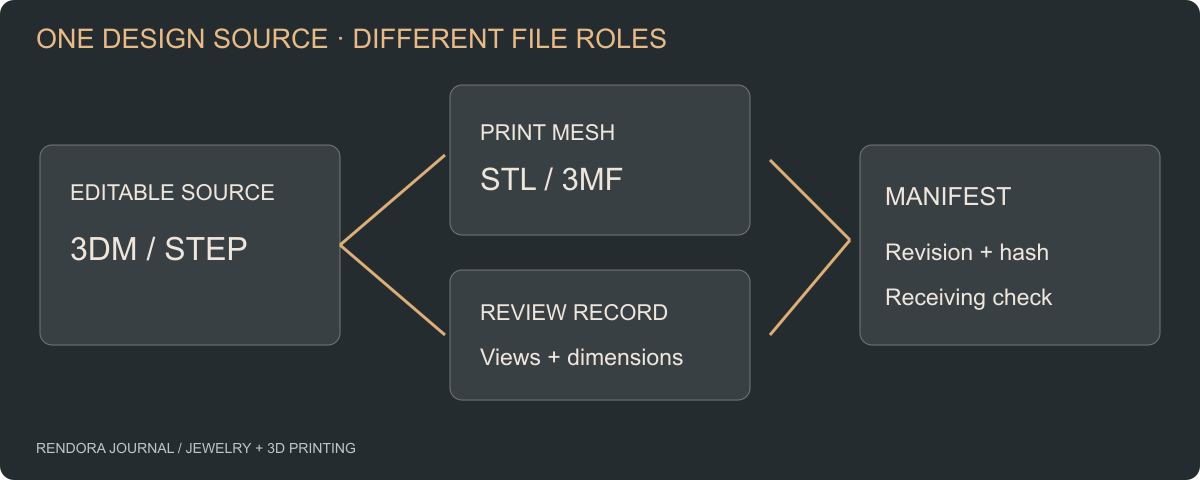
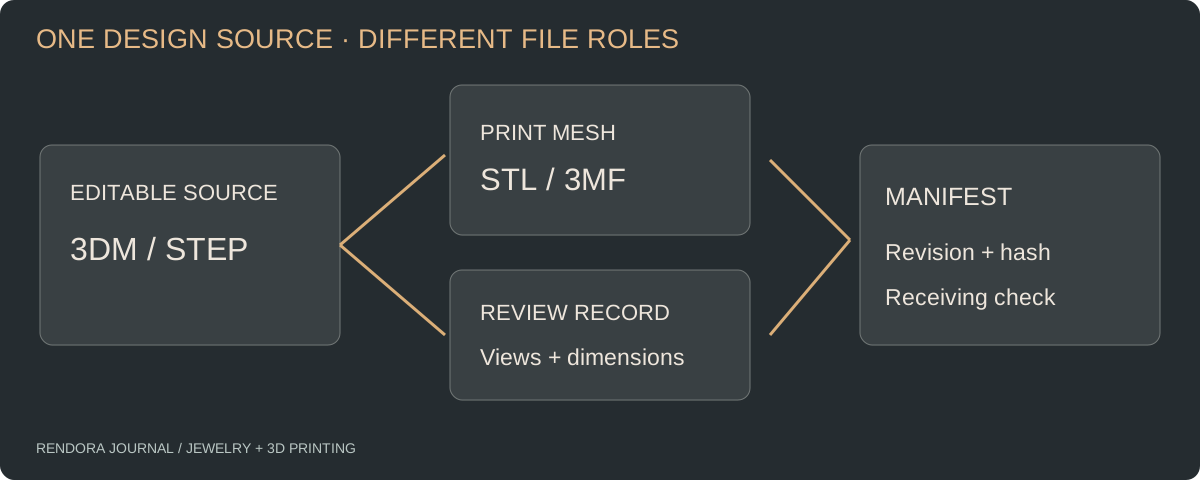
Send the editable CAD for design changes, an agreed mesh format for print preparation and a dimensioned record for acceptance. STL, 3MF, STEP and 3DM solve different parts of the jewelry workflow; a complete handoff often contains more than one.
“Please send the 3D file” sounds specific until the recipient needs to change a stone seat and receives only an STL. The sender may have delivered exactly what the printer accepted last time. The new job needs editable geometry, dimensions and source history as well.
Choose files by the next operation. Keep the native source even when the immediate recipient only wants an export.
Match the format to the task
| Format | Best role in a jewelry handoff | Check before sending |
|---|---|---|
| 3DM | Rhino source document and organized geometry | Application version, object organization and dependencies |
| STEP / STP | Exchange of CAD geometry between compatible systems | Solids, units and what survived translation |
| STL | Triangle mesh for an agreed print-preparation workflow | Units by agreement, dimensions, closure and approximation |
| 3MF | Additive-manufacturing package with defined units and supported metadata | Receiver support for the exact package and extensions |
| OBJ | Mesh/reference exchange where requested | Units agreement and any material or texture dependencies |
A native document can preserve useful organization without guaranteeing a fully editable parametric history. Ask the designer which dimensions can be changed reliably and which features would require remodeling.
McNeel describes jewelry production as a combination of modeling, visualization and fabrication export. Its STL export documentation shows that the manufacturing mesh is generated from source geometry using meshing controls. [1] Treat that mesh as a derived delivery, not the only remaining design master.
Why STL needs an explicit size check
STL stores a triangular surface without a standard unit declaration. Send the intended unit and at least one reference dimension alongside it. In contrast, the 3MF core model specifies a unit; its default is millimeters. [2]
Suppose a ring is intended to have an 18 mm internal diameter. Record that dimension and check it after import. Do not rely on the object looking ring-sized in a viewport that automatically zooms to fit.
If the received size is wrong, confirm how the exporter and importer interpreted units before applying a correction. A unit-conversion error affects every dimension. A wrong ring size may require a local redesign. The ring-sizing guide explains why those problems should not share the same fix.
3MF carries more information, but the recipient still matters
The 3MF core specification defines a package structure, model units, objects and build items. Supported extensions can carry further manufacturing information. [2] Ask the bureau whether it accepts a neutral model package, a slicer project or both. An application may put its own settings in a project that another application cannot reproduce.
Use a small exchange test before sending a large set of sizes. Have the recipient open one package, report dimensions and identify the objects and settings they received. Retain their importer and software version in the acceptance note.
Avoid changing formats merely to make a filename look more production-ready. Converting a faulty STL into 3MF does not reconstruct missing CAD design intent or decide the correct stone clearance.
Keep the source and the export connected
Use a manifest with one row per file. Include its role, source revision, filename, unit, reference dimension and checksum. A review image belongs in that manifest too: it explains what a reviewer saw, but it is not interchangeable with the geometry file.
For a ring family, use stable identifiers such as design, size configuration and revision. Keep process preparation identifiable as a separate derivative. The same approved geometry might be prepared on two printers with different supports; those preparation files should not overwrite the CAD master.
An illustrative delivery might contain:
ring-A-rev-D.3dm: editable source document.ring-A-size-config-02-rev-D.stl: agreed manufacturing mesh.ring-A-rev-D-review.pdf: dimensions and review views.manifest.csv: file identities and receiving checks.
These are example names, not supplied fabrication files. Use your own naming rules consistently and keep the source-to-export relation in the manifest.
Confirm what the receiving tool actually does
An upload can mean storage, preview, conversion or geometry validation. Ask which one is happening before using an “accepted” label as a manufacturing decision.
Rendora’s jewelry tool can retain 3DM, STEP/STP, OBJ, 3MF and STL as source references. Its separate manufacturing-source path inspects binary STL and creates source-linked review outputs. Storing a CAD reference does not automatically convert it into a validated printable mesh.
If the recipient specifically requests ASCII STL, arrange that export rather than renaming a binary file. If Rendora’s binary inspection is part of your handoff, retain a binary export for that step and document any additional format the bureau requests.
Use the format handoff worksheet to ask the receiver for an explicit open-and-measure result. Then continue with the supplier package checklist.
Format questions worth settling early
Is STEP always editable?
It exchanges CAD geometry, but native feature history and jewelry-specific parameters may not transfer. Test the intended change in the receiving CAD system.
Should I send both STL and 3MF?
Send what the bureau requests and identify which file controls the job. Two unlabelled alternatives create uncertainty. Keep both only when their roles and revisions are explicit.
Does a 3DM source replace the review drawing?
No. The source supports editing; the review record states the dimensions and decisions that the recipient must check. Supply both when those tasks are part of the commission.
References
[1] McNeel: Rhino for the Jeweler and STL Import and Export — source modeling and mesh export roles.
[2] 3MF Consortium: Core Specification — package structure, model units and build objects.
About the author
Rendora Journal covers configurable assets, production checks and traceable delivery workflows.