
The file opens, but the walnut finish is missing. Change the seat material and the legs change too. These are handoff problems that a polished front preview can conceal until the launch deadline is close.
A useful ecommerce model needs approved geometry, identifiable components, the intended materials and enough supporting product data to verify it. “The model opens” is only a file check. It does not establish that the model matches what the customer will receive or that it can support your required images and options.
If a supplier has sent a model but the textures are missing, the scale is unclear or the whole chair changes color together, use this guide to request a corrected handoff. You do not need to learn 3D modeling to specify what your team needs.
Tell the supplier what the model is for
Start with the output. A close-up marketing render, a lightweight interactive product page and an editable manufacturing source have different requirements. Requesting “a 3D file” without specifying the destination invites an unsuitable delivery.
| Intended use | Ask the supplier to demonstrate | Do not assume |
|---|---|---|
| Listing images | Required views and approved surface detail | A lightweight web model contains close-up detail |
| Interactive viewer | Appearance and response on intended devices | A high-detail desktop model loads well on phones |
| Material configuration | Correct parts can change independently | One merged object is ready for every option |
| AR placement | Scale and behavior through the intended route | An attractive room preview verifies installation fit |
| Future editing | Editable sources and linked dependencies | A rendered picture includes source ownership |
Use the viewer and configurator comparison if the destination is still uncertain. Decide it before commissioning export work.
Request the evidence alongside the file
Ask for approved dimensions with units, front and side references, rear or underside evidence where needed, material names and identifiers, and a record of the product revision. List any known assumptions.
Shopify’s guide to commissioning a model asks merchants for measurements and detailed reference photographs.[1] That is the key principle: an artist needs evidence to reproduce the product. A confident-looking model is not a measurement record.
For a mechanism, supply evidence of the required positions. A closed drawer or folded table does not reveal its operating geometry. If your catalog only needs the closed state, say so instead of commissioning behavior nobody will use.
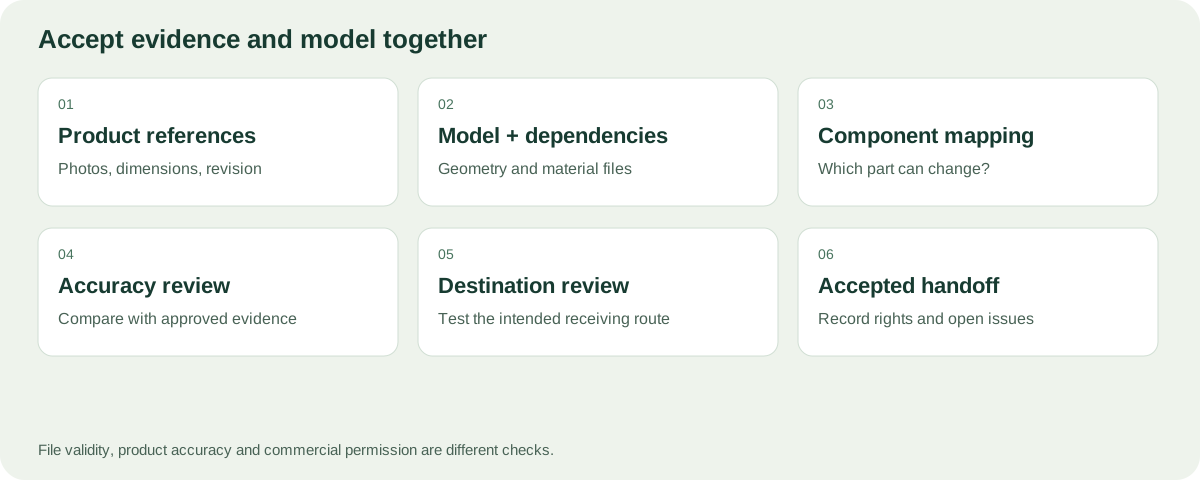
Review the model together with the dimensions, materials and product references.
Check component structure without becoming a modeler
Ask the supplier to change one intended option while leaving everything else unchanged. If a seat fabric change also alters the legs, the material assignment or component structure may not fit your task.
Use understandable names such as seat upholstery, front legs and rear panel. Keep internal codes where needed, but require a mapping your catalog team can understand. A material named “Material.017” offers little help when approving walnut versus oak.
Do not infer component structure from appearance. A picture may show separate cushions even if the model and its materials cannot address them independently. Request a short demonstration or inspection view that proves the required separation.
Review surfaces against real references
Check the material from several angles. Wood grain should not rotate arbitrarily between matching panels. Upholstery seams should correspond to the product. Gloss and reflection should be reviewed under a controlled setup rather than approved from a dramatic hero render alone.

A wood finish contains direction, grain scale, sheen and surface condition—not only a brown color value.
Where the source is incomplete, record what remains uncertain. Do not use generative edits to invent a missing label or connection and then mark it as verified. A proposed appearance can be useful, but it must remain a proposal until approved.
Choose the delivery format by the destination
Ask for a retained editable master where your agreement includes it, plus the derivative needed by the destination. Shopify currently lists GLB and USDZ for product models.[2] That does not mean a CAD file becomes a suitable storefront model by changing its extension.
Texture files and their links matter. Request the complete package rather than a model that only works on the supplier’s computer. Confirm the export includes the intended units, orientation and material assignments. A format can carry data without guaranteeing that every receiving system uses it identically.
If the immediate requirement is fixed pictures, make the accepted image set a separate delivery. See how to create ecommerce images from models. Do not force a merchant to open a 3D application to obtain the launch images they commissioned.
What to do when the model opens but still fails the brief
Start by separating four problems: missing dependencies, inappropriate component structure, inaccurate product appearance and unsuitable destination export. They need different correction requests.
| Observed problem | Evidence to send the supplier | Requested outcome |
|---|---|---|
| Model appears untextured | Receiving workflow and missing-file message | A complete package that opens with intended materials |
| Everything changes color together | Intended option and unaffected parts | Independent assignment of the required surfaces |
| Dimensions do not match | Approved measurement and model measurement | Correct units or geometry, with the change identified |
| Rear construction is wrong | Rear product reference and comparison | Model aligned with the current product revision |
| Web delivery performs poorly | Device and receiving route | Appropriate derivative with appearance rechecked |
Avoid asking the supplier simply to “make it lighter” or “make it correct.” State the use case and acceptance check. A reduction that removes a visible joint may make the file smaller while making the product less accurate. A corrected texture should not silently introduce a different finish.
Use a handoff package that another person can understand
Your package should make it possible to answer which product is represented, what can change and what remains unresolved. Request a readable file inventory and product reference list, not only a directory of unexplained filenames.
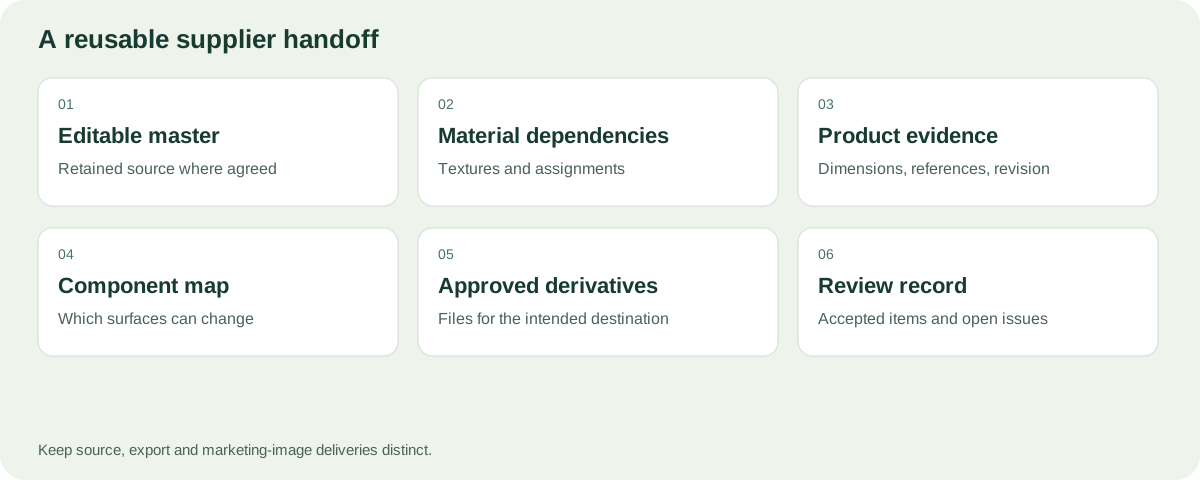
Keep the editable master distinct from exported derivatives and final marketing images. A future artist should not have to guess whether the lightweight web model is the only surviving source. If the agreement does not include the source, record the service required for future changes.
For material references, include the actual supplier identifier rather than only “light wood.” Record which part it applies to and whether the reference is approved or still under review. When files move between teams, that small amount of context prevents many appearance disagreements.
Decide how revisions will be accepted
Suppose the supplier replaces a leg and changes the upholstery at the same time. Ask them to identify both changes. Review geometry against the new construction reference and material against the new swatch. Do not approve the entire revision based only on the front thumbnail.
Keep the earlier accepted release until the replacement is reviewed. List the images and configurations affected by the change. If a finish is renamed without changing appearance, update the mapping and labels; if the physical material changes, recheck the visual outputs as well.
An unresolved issue should have an owner and an intended next step. “Backside inferred; awaiting supplier reference” is actionable. “Ready” is not, if nobody has compared that surface with the product.
Treat accuracy and file validation as complementary
You can ask a technical specialist to check file structure while a product owner checks the represented item. Neither review replaces the other. Keep their outcomes separate so one passing report does not conceal an unresolved material or dimension issue.
For a small first delivery, agree one model, one configuration and one representative output. Once that handoff works, expand to related finishes. This gives you a reusable process rather than a growing pile of files that only the original artist can explain.
Accept the delivered package
Use three separate decisions: technically readable, product evidence accepted and suitable for the requested output. A model can pass the first and still wait for a rear reference; it can pass product review and still need preparation for a marketing close-up. Record the open issue instead of reducing these decisions to a single “ready” badge.
Download the supplier model checklist. Open the delivered package in the intended receiving workflow, not only the supplier’s viewer.
- Confirm the exact product revision and dimensions.
- Inspect front, rear, side and relevant hidden areas.
- Compare the agreed material references.
- Exercise one required component or material change.
- Produce or inspect one intended output.
- Record failures and request specific corrections.
Khronos provides an official glTF Validator for file-level validation.[3] A technical specialist can use such checks as supporting evidence. Passing them does not replace product accuracy, permission checks or storefront testing.
What Rendora does with this distinction
The ecommerce tool distinguishes trusted product sources from visual candidates. Its current photo and aligned-layer package paths do not automatically repair arbitrary CAD, build every material variant or create a validated interactive Shopify model.
Keep the approved model and evidence even if your immediate Rendora deliverable uses rendered images. They remain the reference for future revisions. Use the release checklist for the images themselves.
FAQs
My model is one object. Is it unusable?
Not necessarily. It may be suitable for a fixed view. For independent component changes, ask whether the needed surfaces and parts can be addressed correctly.
Can I use a manufacturing CAD file directly on my product page?
Do not assume so. It may need export, visual materials and optimization for the destination. Confirm the actual receiving requirements.
Who owns the model after I pay?
That depends on the agreement. Specify source files, usage rights, redistribution and future editing before commissioning work.
Does a validation report prove the product is accurate?
No. File checks can reveal technical defects. They cannot establish the physical product’s dimensions, finish or commercial rights without supporting evidence.
Sources and notes
[1] Shopify: Hiring a Partner to create 3D models.
[2] Shopify: Product media types. Verify the current requirements before commissioning a delivery format.
[3] Khronos glTF Validator. Technical validation tool, not a product or storefront certification.
About this guide
Rendora publishes practical guides to product configuration and asset delivery. This guide draws on the linked documentation and editorial analysis. Worked examples and review protocols are identified in the text.