
The images arrive on Friday afternoon: a folder of chair renders, several files called “final” and two wood finishes that look nearly identical in thumbnails. The upload is straightforward. Knowing which picture belongs to which sellable item is not.
Use a stable product or SKU identifier, a clear view name and a revision in each filename—but keep an explicit mapping register as the authority. A readable filename helps a person find an image. It cannot, on its own, describe every place that image should appear or prove it represents the current product.
This guide is for the person receiving images, assigning them to listings or handing them to another channel. You do not need a new digital asset management system to start. You need a small set of identities that survives a renamed product and a second production batch.
Give each identifier one job
A product family, a sellable configuration and an image are not interchangeable. A chair family might have many finish combinations. One configuration can need a main view and a rear view. Each view might be delivered in JPG and WebP.
| Identity | Example for a fictional chair | What it identifies |
|---|---|---|
| Product family | LUNA | The range, not a complete order |
| Merchant SKU | LC-OAK-CHAR | One approved sellable configuration |
| Image role | main-3q | The buying question or viewpoint |
| Source revision | r03 | The approved source used to make the image |
| Delivery encoding | jpg or webp | A file format, not another angle |
Keep the merchant SKU exactly as the catalog requires in the mapping register. Do not quietly strip punctuation or shorten it to make a prettier filename. If your publishing system needs a safer file token, record both values and check that two different SKUs do not become the same token.
Cylindo’s product-data guidance makes the same practical distinction between product and option codes, and recommends aligning identifiers with the merchant’s own system.[1] The naming convention below is an editorial approach you can adapt, not a platform-required syntax.
A filename a colleague can understand
For a simple operation, use this pattern:
product-token — configuration-token — view — revision — delivery-size.extension
One example is luna-chair-lc-oak-char-main-3q-r03-1600.jpg. Its WebP counterpart can have the same stem. Prefer ordinary letters, numbers and separators accepted by your destination. Avoid customer names, access tokens and temporary private links in filenames.
Do not pack everything into the name. Material supplier details, licensing terms, approvers and usage history belong in records. A filename that needs a paragraph to explain is no longer a convenient navigation aid.
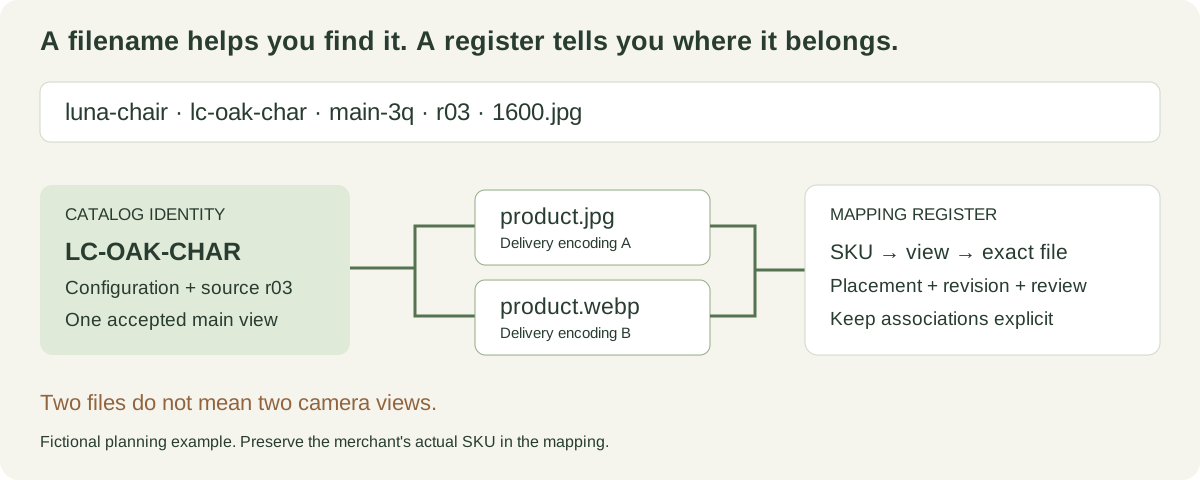
The filename is a label. The mapping register connects that label to the catalog and its approved source.
| Field | Useful rule | Avoid |
|---|---|---|
| Product token | Stable enough to survive a marketing rename | Replacing the identity whenever the display title changes |
| Configuration | Use a controlled SKU token or configuration ID | “blue-one” when several blue materials exist |
| View | Maintain a short shared vocabulary | Calling the same camera “front,” “hero” and “angle1” |
| Revision | Identify the source or approved image release | final-final-new |
| Size | Include it when delivering several resolutions | Treating a larger export as a new creative view |
Google recommends short, descriptive image filenames and useful alt text.[2] That does not mean repeating the same sales keyword in every field. The operational identity should remain clear, and the page’s alt text should describe the actual visible item.
Keep the register alongside the files
Download the SKU image mapping template. At minimum, record the exact SKU, configuration, view, source revision, file and intended placement. Add approval status and the person responsible for resolving exceptions.
Keep status out of guesswork. “Approved” should refer to a named file and revision. A CSV row copied from a previous batch should not automatically inherit the previous approval when its file changes. Similarly, a file hash can identify unchanged bytes, but it does not explain whether the merchant has accepted the depicted product.
Separate the link to the source from the public location. Production storage may use private, expiring URLs. A live listing needs an approved delivery location; an expiring review link should not become a permanent product image reference.
If you manage only a few products, a shared register can work. Once several teams update records simultaneously, choose a system with controlled updates and a change history. The decision is about coordination, not an arbitrary SKU count.
One image can belong to several SKUs
Suppose three sizes share an upholstery close-up. You can map the same image to three SKUs if the detail is genuinely representative and the placement does not imply identical dimensions. Record three associations with one image ID instead of making three untracked copies.
The main view is a different question. If the large chair has a wider back or different proportions, sharing the small chair’s main image can mislead. Reuse should follow product truth, not just a matching color label.
Likewise, a different camera does not create a new SKU. Store “rear” as an image role. Keep finish and component options attached to the actual configuration. For the production-side distinction, use the variant consistency guide.
Do not confuse one image with two encodings
A JPG and a WebP generated from the same accepted view are alternative delivery files. They do not satisfy a brief that asked for a main image and a rear image. Your register should allow both encodings to point to one logical view while keeping their exact filenames and intended destinations separate.
This matters during a replacement: both encodings may need updating even though the creative change happened only once.
Reconcile a batch before uploading it
Start with a small representative set: two visually similar finishes, a product with a different size, a shared detail and a revised image. Compare the catalog identity, the register and the opened image—not just the filename.
Check missing expected views and unexpected files separately. A folder containing the right number of images may still contain one duplicate and one omission. Check case-only filename differences if files move between operating systems, and verify that a new export has not overwritten an unrelated file with the same stem.
Try the following handoff exercise with a colleague: give them the register and a clean folder, without the production chat history. Can they identify the primary image for each selected SKU and the current revision? Record any ambiguous label and correct the convention before expanding the batch. This is a repeatable exercise, not a reported customer test.
For acceptance beyond naming, use the image quality checklist. To diagnose files that are correct but display incorrectly on a storefront, continue to Shopify variant image troubleshooting.
What a Rendora mapping file contains
Rendora’s supported ecommerce image-package path includes a merchant SKU media mapping with a configuration ID, configuration fingerprint, selected options and JPG/WebP file entries. Those fields help reconcile the package with the intended item. The schema also identifies whether the source was an approved product photograph or component layers.
The export is not a Shopify import contract and does not automatically assign images inside the store. The image entries currently identify primary outputs; they do not prove that a multi-angle gallery has been produced. Match the actual download to the requested views before uploading.
If you rename the exported files for a channel, update your downstream register accordingly and preserve the original mapping as the delivery record. Do not change only the filename while leaving every record pointing to a file that no longer exists.
You can explore the ecommerce workflow once your approved images and SKU identity are ready. For long-term maintenance, keep the product-image update plan with the register.
Questions that come up during handoff
Must every filename contain the full SKU?
No. Use the full SKU when practical or a stable token when required by the destination. Preserve the exact merchant identity in the mapping and verify the token is unique.
Can I rename old images for SEO?
Do not rename live assets without considering their existing references. Descriptive names are useful, but a change should include updating dependent links and checking the live placements. Renaming is not a substitute for relevant content or accurate alt text.
Does a consistent filename prove the product is right?
No. It proves only that a naming rule was followed. Open the image, compare the finish and construction, and reconcile it with the source revision.
References
[1] Cylindo: Product Data Guide.
[2] Google Search Central: Image SEO best practices.
About this guide
Rendora publishes practical guides to product configuration and asset delivery. This guide draws on the linked documentation and editorial analysis. Worked examples and review protocols are identified in the text.