An artist can export both GLB and FBX. The team asks which one is “better,” but the useful question is which file preserves the required data through your receiving workflow.
Choose the handoff format by the target importer, required asset behavior and retained source—not by file extension alone. Use a representative asset to verify geometry, materials, hierarchy and animation through the exact route before commissioning a large batch.
GLB is the binary container used by glTF. FBX is another interchange format used in many DCC-to-engine workflows. Keep the editable master when future authoring is part of the agreement, and produce the derivative the receiving project needs.
Make the receiving route the first decision
| Receiving task | Decision to confirm | Evidence before scaling |
|---|---|---|
| Unity project using FBX import | Model, material and animation settings | Imported sample and saved settings |
| Unity project using GLB | Installed glTF importer and supported features | Sample through that package/version |
| Unreal project using FBX | Static/skeletal route and naming conventions | Imported materials, LOD and collision setup |
| Unreal project using glTF/GLB | Project’s glTF import route and feature handling | Representative sample and import log |
| Browser-based review or delivery | Supported glTF extensions and packaging | Model loads with intended dependencies |
UnityGLTF’s maintained documentation describes editor and runtime glTF/GLB import.[1] Epic documents glTF support as well as a separate FBX static-mesh pipeline.[2][3] Record which route you use; “Unity” or “Unreal” by itself is not a complete format requirement.
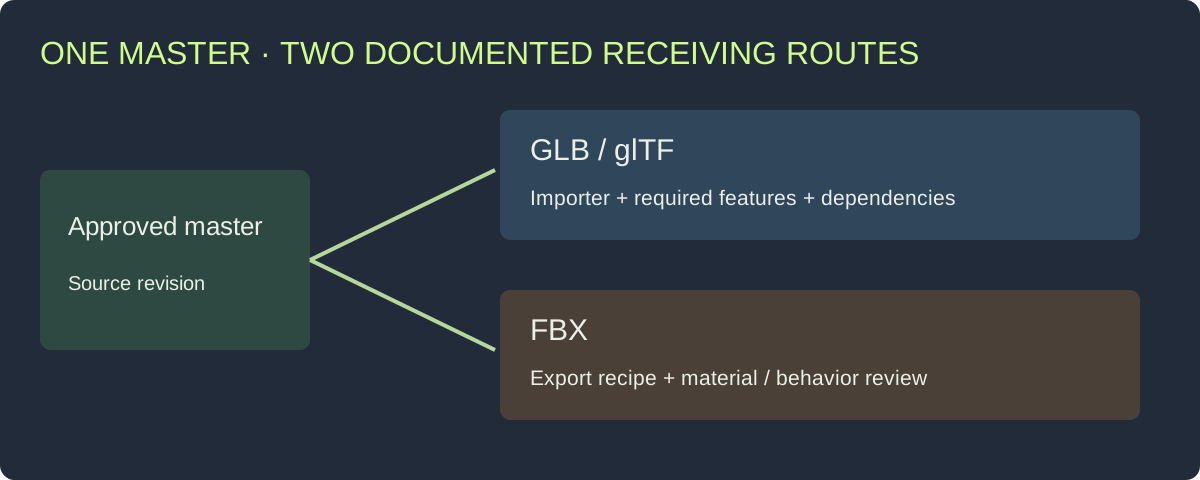
Keep one approved source and verify the derivative through its actual receiving route.
Compare the delivery task, not marketing labels
For a static prop, ask whether the file carries the geometry, normals, material assignment and texture relationships your route expects. For a character, add the skeleton, weights, clips and required deformation behavior. For a modular environment piece, review dimensions and placement as well as appearance.
An exporter may write a feature that the receiver interprets differently or does not use. Run the first sample through the full path and record the outcome. This avoids discovering midway through a batch that a material convention or attachment workflow needs conversion.
| Requirement | What to verify in either route |
|---|---|
| Geometry | Expected surfaces, normals, dimensions and transforms |
| Materials | Slots, image dependencies and shader interpretation |
| Hierarchy | Required parts and unique node identities |
| Animation | Intended tracks, clips and receiving behavior |
| Runtime derivatives | Correct LOD/collider role and assignment |
| Future changes | Retained source and a documented export recipe |
What a GLB package does—and what you still organize
A GLB file can bundle the glTF scene description and binary data, with images embedded when exported that way.[4] Inspect the actual file and dependencies rather than assuming every export is self-contained. Record required extensions and the importer’s handling of them.
A single-file delivery can simplify transport, but you still need an asset ID, source revision, usage information and review record. If the project also needs separately supplied LODs or collision, list their roles explicitly.
The GLB validation guide provides downloadable files and reports for diagnosing structural and attribute problems. Keep that check alongside the receiving-project review, especially when a file loads but misses a requested UV or material relationship.
What an FBX handoff needs from the team
Agree the exporter/importer route and the data expected to survive it. Keep the texture inventory and receiving material setup with the file. If the team remaps materials after import, document the mapping so reimporting a corrected mesh preserves the intended result.
For Unreal’s documented FBX static-mesh route, follow its collision and socket conventions.[3] A name used by that route should not be assumed to establish the same behavior in a separate GLB workflow. If an attachment node is important, demonstrate its position and use in the receiving setup.
Avoid repeatedly converting between interchange formats as a substitute for fixing the source. Retain the authoring master, export the required derivative and review it. An extra conversion may change material or hierarchy data and introduces another step to reproduce.
Use one representative sample to settle the choice
Choose an asset containing the features that matter to the project: multiple materials, a meaningful pivot, required node names and any animation or derivatives. A plain cube can test basic loading, but it does not exercise a character or modular environment workflow.
Write the expected result before exporting. Then test each candidate route against the same source revision:
- Export with recorded settings and include dependencies.
- Import through the named package or engine route.
- Measure scale and inspect transforms and hierarchy.
- Review materials under the same scene conditions.
- Exercise required behavior and derivative assignment.
- Save the settings, findings and chosen route.
Download the format route worksheet. It separates the expected data from the observed result, so a team can choose a route based on the actual sample rather than a generic compatibility table.
Plan for updates before accepting the first release
Ask who will re-export a material change, geometry repair or new animation. Keep the source revision, export preset, destination settings and file inventory together. If the deliverable excludes editable sources, record the service or handoff required for future revisions.
When both GLB and FBX are delivered, identify their relationship. Are they exports of the same accepted master, or was one edited independently? A silent divergence creates difficult bugs: the browser preview may show a repaired handle while the runtime file still has the older geometry.
Use the outsourced asset acceptance workflow to organize that decision at the brief, sample and final handoff stages.
Prepare the current Rendora input route
The Rendora game asset tool uses a GLB production master with supplied GLB LOD/collider files. FBX can be retained as rig or animation reference. Prepare the target-engine derivative through the route agreed with your team, and retain the technical report and import note with the package.
If the immediate problem is a missing surface rather than format selection, use the texture troubleshooting guide. If you are deciding which source files to request, start with the asset delivery checklist.
FAQs
Is GLB only for browsers?
No. GLB can be used through supported engine importers as well. Confirm the receiving package/version and the required features.[1][2]
Does FBX automatically preserve every material?
Review the exported material data, dependencies and receiving shader setup. Verify a representative sample before making that route a batch requirement.
Should I deliver both formats?
Deliver both when they serve defined receiving tasks. Keep them linked to the same approved source revision and record any differences.
Is a smaller exported file always the better choice?
Compare the required data and target behavior first. Use the asset budget guide for runtime constraints rather than treating transport size as a complete performance measure.
References
[1] Khronos UnityGLTF: documented editor and runtime import routes.
[2] Epic Games: glTF File Format Support.
[3] Epic Games: FBX Static Mesh Pipeline.
[4] glTF 2.0 specification: GLB container and resources.
About the author
Rendora Journal covers configurable assets, production checks and traceable delivery workflows.